The kernel has never heard of containers
Go looking through the Linux syscall table for the call that makes a
container and you won't find one. There's no create_container(), no
container struct, no subsystem that owns the concept. On the machine this was written
on there are 373 syscalls, and not one of them contains the word.
Which is awkward, because you've been running them for years.
What Docker actually does is assemble one out of parts that already existed. Once you've seen the parts, you can build the cgroup half yourself in about four commands. That's this piece. If you've been treating containers as a black box that occasionally OOMKills your pod, this is the layer underneath it.
What a container is made of
Three things, pointed at one ordinary process.
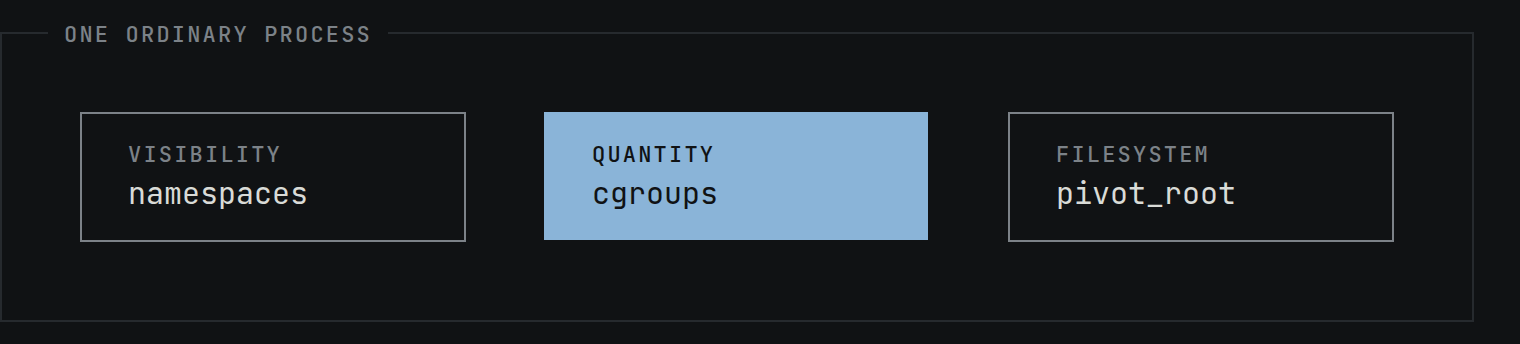
Namespaces control what a process can see. A network namespace gives it its own interfaces and routing table. A mount namespace gives it its own view of the filesystem tree. A PID namespace gives it its own process numbering, so it becomes PID 1 and can't signal anything outside. Every process already has a full set, and you can look at your own.
$ ls -l /proc/self/ns/
cgroup           -> cgroup:[4026531835]
ipc              -> ipc:[4026531839]
mnt              -> mnt:[4026531832]
net              -> net:[4026531833]
pid              -> pid:[4026531836]
pid_for_children -> pid:[4026531836]
time             -> time:[4026531834]
time_for_children -> time:[4026531834]
user             -> user:[4026531837]
uts              -> uts:[4026531838]
One correction worth making early, because it's the most common thing people get
wrong here. A PID namespace on its own does not hide anything. It gives you separate
numbering and stops you signaling outside it, but a process alone in a fresh PID
namespace reading a /proc that was mounted in the host's namespace still
sees every process on the box. Hiding them takes a mount namespace and a freshly
mounted /proc. The namespaces do different jobs and they work as a set,
and the set is leaky exactly where you'd expect a patchwork to be.
A container isn't given namespaces that you lack. It's given different ones. Though
not all of them, and the exceptions matter. A default Docker container shares your
user and time namespaces and only differs in the other six.
Sharing the user namespace is exactly why root inside the container is root on the
host, which is the thing the next section is about.
cgroups control how much a process can use. CPU time, memory, IO bandwidth, how many processes it's allowed to fork. This is the part everyone has heard of and almost nobody has touched directly.
A root filesystem, swapped in with pivot_root, decides
what it runs against. That's where your image goes.
Here's the division of labor that makes the whole thing click.
Namespaces are about visibility. cgroups are about quantity. A process with namespaces but no cgroups can't see the host but can happily eat all of its RAM. A process with cgroups but no namespaces sees everything on the box but can only use the slice you gave it. You need both, and they're completely independent features that people conflate constantly.
That division is the one to keep. It's the difference between being isolated and being contained, and the industry uses the two words as if they're the same thing.
And a fourth thing, which is doing more work than you think
That split is a clean way to hold the resource story in your head, and it's most of what this piece is about. But it is not the whole of what a real runtime gives you, and it would be dishonest to stop there.
Because the user namespace is shared by default, a container's root really is the
host's root. What stops that being catastrophic is a third layer that has nothing to do
with either namespaces or cgroups. A default docker run also drops most
capabilities, installs a seccomp filter, and applies an AppArmor profile.
# default docker run, no --privileged, no --security-opt
CapEff:          00000000a80425fb   # 14 of 40 capabilities
Seccomp:         2                  # SECCOMP_MODE_FILTER
AppArmorProfile: docker-default     # enforcing
Namespaces and cgroups decide what a process sees and how much it gets. Capabilities, seccomp and the LSM decide what it's allowed to ask the kernel for. Strip those away and what you have left is isolated, but it is not contained.
A cgroup is a directory
This is the part that tends to surprise people, and it's the reason cgroups are so much more approachable than they sound.
There's no create_cgroup() syscall either. The configuration interface
is a filesystem.
$ stat -fc %T /sys/fs/cgroup
cgroup2fs
You create a cgroup with mkdir. You put a process in it by writing a PID
to a file. You limit it by writing a number to another file. That's the whole API, no
library and no daemon. The one asterisk is placement rather than configuration, because
since 5.7 clone3() takes a CLONE_INTO_CGROUP flag that spawns
a process straight into a cgroup without touching cgroup.procs at all.
And you don't need root to try it, because systemd has already handed you a subtree of your own. It is a privileged helper doing that on your behalf, which is worth naming rather than pretending the kernel just lets anyone carve up the tree.
$ cd /sys/fs/cgroup/user.slice/user-1000.slice/user@1000.service
$ cat cgroup.controllers
cpu memory pids
Three controllers, delegated to an unprivileged user. That's enough to do something real. Remember this the next time someone sells you a resource management tool. The primitive is a directory you can already write to.
Building the cgroup half by hand
Make a cgroup and give it a 32 MiB memory ceiling.
$ mkdir tbi-demo
$ echo 32M > tbi-demo/memory.max
$ cat tbi-demo/memory.max
33554432
Now put a process inside it and have that process try to allocate a lot more than
32 MiB. Writing your own PID into cgroup.procs moves you in, and everything
you exec from there inherits it.
$ bash -c 'echo $$ > tbi-demo/cgroup.procs; exec python3 -c "
x = bytearray()
while True:
    x += bytearray(1024*1024)
"'
Killed
$ echo $?
137
137 is 128 plus 9, which is the shell's way of saying the process took a SIGKILL. Nothing was configured, no runtime was involved, no image was pulled. A directory and two writes was enough to constrain a process the kernel would otherwise have let run until the machine died.
That is, mechanically, what your container runtime is doing for you.
The receipt is worth reading
The interesting part isn't that it died. It's what the cgroup recorded on the way.
$ cat tbi-demo/memory.events
low 0
high 0
max 35725
oom 1
oom_kill 1
oom_group_kill 0
sock_throttled 0
One kill. And 35,725 times the cgroup was about to cross the ceiling before that.
Be precise about what that counter is, because the name invites the wrong reading.
The kernel defines max as the number of times usage was about to go
over the boundary. It isn't a count of successful reclaims. What it tells you is
that the limit was reached over and over, and all but the last of those the kernel
resolved without killing anything.
So memory.max isn't a wall the process bounced off once. It's a trigger
that fired constantly, and the kill was the one time it couldn't be resolved. If you
want that unpacked properly, it's the whole subject of
Your memory limit is not a
limit.
Two footnotes on that block. The counter you'd want if you specifically care about
throttling is high, not max, and here it's zero because
nothing set memory.high. And the exact number varies between runs, so
don't expect to reproduce 35,725. The magnitude is the point.
What else you can control
Memory is the one people meet first. The others follow the same pattern, a file you write a number into.
cpu.maxtakes a quota and a period, like50000 100000for half a core.cpu.weightis relative share instead of a hard cap.memory.maxis the hard ceiling.memory.highthrottles hard instead of killing, though the limit can still be breached under pressure.memory.minis a hard reservation the kernel will OOM rather than reclaim, andmemory.lowis the best effort version that yields when there's nothing else left to take.io.maxlimits bytes and operations per second per device.pids.maxcaps how many tasks can exist in the cgroup. Note tasks, not processes. Threads count against it too, which is how a JVM or a Go service with a big thread pool hits this limit without ever forking.cpuset.cpuspins the cgroup to specific cores.
Controllers aren't automatically on for children. A parent has to hand them down
explicitly through cgroup.subtree_control, which is what that
+memory syntax you sometimes see is doing.
$ echo '+cpu +memory' > cgroup.subtree_controlWhy v2 looks different to what you remember
If you learned this on cgroup v1, the mental model changed.
v1 allowed any number of independent hierarchies, each mounting one or more
controllers. In practice most of them ended up with a single controller each, which is
why you'd see cpu,cpuacct and net_cls,net_prio co-mounted and
everything else on its own. A process could sit in one place in the memory tree and a
completely different place in the CPU tree, which made coordinating two controllers
nearly impossible. v2 is a single unified hierarchy. One tree, every controller, one
location per process.
v2 also enforces something v1 didn't, and it catches people out. It gets described as
"a cgroup with children can't hold processes," which is wrong and will waste your
afternoon. The actual rule is about enabled controllers. A cgroup cannot both
contain processes and have controllers enabled in
cgroup.subtree_control.
The distinction is testable. A cgroup with children and an empty
subtree_control holds processes perfectly happily. A cgroup with no children
at all but one enabled controller refuses them. And it cuts both ways, so enabling a
controller on a cgroup that already contains a process fails too. Either direction gives
you EBUSY.
# has a child, no controllers enabled
$ echo $$ > parent/cgroup.procs        # works

# no children, one controller enabled
$ echo memory > leaf/cgroup.subtree_control
$ echo $$ > leaf/cgroup.procs
bash: echo: write error: Device or resource busy
The root cgroup is exempt, and so are threaded subtrees, where a process's threads can sit in different cgroups without tripping the rule at all.
This isn't academic anymore. v1 is being removed rather than merely discouraged.
systemd refused to boot on the legacy hierarchy from v256 and removed cgroup v1 support
outright in v258, so there is no override left. On the Kubernetes side, the kubelet's
failCgroupV1 setting defaults to true as of 1.35. The node boots fine, but
the kubelet won't start on a v1 host unless you set failCgroupV1: false in
its config.
If you're still on v1, treat that as a project, not an opinion. The platform is deciding for you either way.
So how does Docker use any of this
When you run a container, the thing that actually talks to the kernel is a low level
runtime, usually runc. It reads an OCI spec, a JSON file describing what
you asked for, and that file has a linux.resources block.
// what "docker run -m 512m --cpus 0.5" becomes
"resources": {
  "memory": { "limit": 536870912 },
  "cpu":    { "quota": 50000, "period": 100000 }
}
The order runc does things in is worth knowing, because it isn't the obvious one. It spawns the init process with the namespace flags, then immediately creates the cgroup and moves that process into it, before any filesystem work happens at all. The comment in the source says why, and it's the good kind of paranoid.
// Do this before syncing with child so that no children
// can escape the cgroup
if err := p.manager.Apply(p.pid()); err != nil {
Only then does it write the limits, pivot into your root filesystem, and block.
The execve() of your entrypoint doesn't happen until runc start
releases it. Cgroup first, rootfs second, exec last.
After that runc exits. Nothing is metering your syscalls, which is the real point.
But a containerd-shim does stay behind for the container's whole life as
the process's direct parent, holding its stdio and reporting its exit code, so "nothing
is left running" would be too strong.
So docker run -m 512m is, underneath, a mkdir and an
echo 536870912. Two echoes actually, because with no explicit
--memory-swap Docker also sets a combined memory plus swap limit at twice
the value.
On a Kubernetes node there's one more layer than people usually draw. You write
resources.limits.memory in a manifest, the kubelet turns it into a CRI
request, containerd turns that into the OCI spec, containerd hands it to runc,
and runc writes the file. The kubelet never builds an OCI spec itself. Every abstraction
in that chain exists to eventually write a number into a directory.
The boring conclusion
A container isn't a box and it isn't a small VM. It's a normal process on a normal kernel, with a restricted view and a spending limit, and the kernel doesn't know it's special.
Which explains a lot of the weirdness. It's why ps on the host shows
container processes as ordinary PIDs. It's why you get an exit code 137 rather than
anything that mentions Docker. It's why a container can see the host's kernel version,
because it is the host's kernel.
One place that reasoning stops short, since this piece is aimed at people whose pods
get OOMKilled. The kernel kills a process, not an abstraction called a container. But
Kubernetes has set memory.oom.group on cgroup v2 nodes since 1.28, which
asks the kernel to take down every process in the container's cgroup together. So in a
pod you usually do lose the lot, and that's a deliberate choice made above the kernel
rather than something the kernel does on its own. Docker doesn't set it, which is why
the demo above shows oom_group_kill 0.
The abstraction is genuinely good and you shouldn't have to think about this most days. But the day something gets killed and the logs say nothing useful, the layer you actually need is a directory with some files in it, and you can go read it.
What's the abstraction you had to break open before you really trusted it?