Your memory limit is not a limit
One cgroup on the machine I'm writing this on reports three different answers to the question "how much memory is this using." 25.2 GiB, 15.9 GiB, and 29.5 GiB. All three are correct. Only one of them is the number that gets a container killed.
That gap is why a pod can get OOMKilled while its memory graph sits flat with headroom to spare. The graph isn't broken and cAdvisor isn't lying. It's reporting exactly the number it says it reports.
It's just answering a different question than the one the kernel asks.
This one assumes you know what a cgroup is and how a container gets one. If that's shaky, start with The kernel has never heard of containers and come back.
What the graph was actually showing
Almost every Kubernetes memory dashboard is built on
container_memory_working_set_bytes. That metric is not what the kernel
compares against your limit. It's derived, and the derivation is this.
working_set = memory.current - inactive_filememory.current is the real number, the total charged to the cgroup.
inactive_file is page cache the kernel thinks nobody has touched in a
while. Working set subtracts it on the theory that it's reclaimable, so it doesn't
really count against you.
That theory is mostly right, and it's a reasonable thing to put on a dashboard.
But the kernel never looks at it. Here's a real cgroup on the machine I'm writing this
on, straight out of /sys/fs/cgroup.
$ cd /sys/fs/cgroup/user.slice
$ cat memory.current memory.peak
27011510272    # 25.2 GiB, what the kernel is tracking
31626129408    # 29.5 GiB, the highest it has ever been

$ grep -E '^(anon|file|inactive_file) ' memory.stat
anon           14490767360    # 13.5 GiB
file           10299621376    #  9.6 GiB
inactive_file   9929940992    #  9.2 GiB
Working set here is 25.2 minus 9.2, so about 15.9 GiB. That's the number your dashboard draws. The kernel is tracking 25.2 GiB, and at some point it was holding 29.5 GiB.
So there are the three numbers from the top of this piece. They differ by more than 13 GiB, and only one of them is the one that gets you killed.
If you want to see this on your own cluster, put both cAdvisor metrics on the same axis for a single container.
# what your dashboard almost certainly draws
container_memory_working_set_bytes{pod="api-7d9f"}

# this one tracks memory.current, the number the kernel compares
container_memory_usage_bytes{pod="api-7d9f"}
The space between those two lines is your reclaimable page cache. It's usually boring. It stops being boring the moment reclaim can't keep up with it.
Worth saying that neither metric gives you memory.peak. There's no
cAdvisor series for it, which is why the rest of this piece ends up on the node.
Dashboards draw the friendly number. The kernel keeps the real one. That gap is where your incidents live.
memory.max is not a wall
Here's the part that changes how you read one of these incidents.
memory.max doesn't stop an allocation. It isn't a barrier the kernel
refuses to let you cross. It's a trigger.
When an allocation would push memory.current past
memory.max, the kernel doesn't fail the allocation and it doesn't kill
anything. It goes into direct reclaim, synchronously, in the context of the process
that asked for the memory. It walks the LRU lists and tries to free enough to make room.
Your process is stalled while this happens, which is why a container near its limit gets
slow before it gets dead.
Only if reclaim can't free enough does the cgroup go to OOM, and only then does something get killed.
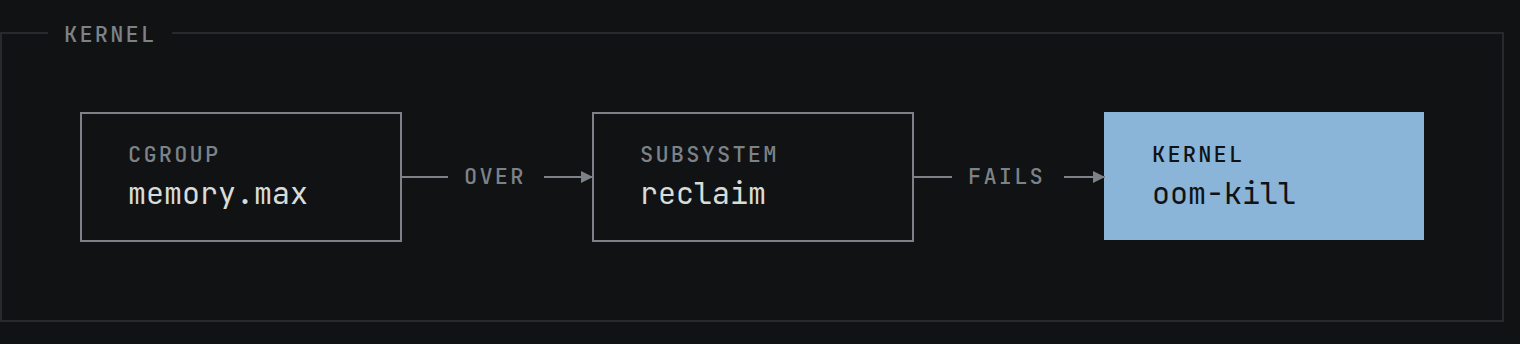
That distinction is the whole thing. Your pod didn't die because it hit a number. It died because the kernel tried to make room, and couldn't, fast enough.
Which means the interesting question is never "what was the usage." It's "why did reclaim fail."
What reclaim can actually give back
Reclaim has two sources, and on a normal Kubernetes node only one of them exists.
- Page cache. File backed pages. Clean ones get dropped, dirty ones get written back and then dropped. This is cheap and the kernel is good at it.
- Anonymous memory. Heap, stacks, anything with no file behind it. The only place to put these is swap.
Kubernetes has historically run with swap off, and most clusters still do. No swap means anonymous memory has nowhere to go, which means it cannot be reclaimed at all.
Most people treat swap off as a performance setting. For this discussion it's a structural one, because it decides what the word "reclaim" can even mean on your node.
So on a swapless node your real usable limit isn't memory.max. It's
memory.max minus however much anonymous memory your process is holding,
and page cache is the only slack you have. Look at that machine above again. 13.5 GiB
of that is anon. On a swapless node, that 13.5 GiB is a floor. Reclaim
can never touch it.
This is also why the failure looks so sudden. Reclaim happily evicts page cache for a long time and everything seems fine, apart from getting slower. Then the page cache is gone, the next anonymous allocation arrives, there's nothing left to free, and the OOM killer runs. The graph looks flat right up until it doesn't.
The file that keeps the receipt
You don't have to infer any of this. cgroup v2 writes it down in
memory.events.
$ cat memory.events
low 0
high 0
max 0
oom 0
oom_kill 0
oom_group_kill 0
sock_throttled 0
Read it like this, and be careful with the first one because the field name is misleading.
highcounts how many times usage crossedmemory.highand the cgroup was throttled into direct reclaim. This is the throttling counter.maxcounts how many times usage was about to go overmemory.max. It is not a count of reclaims and it says nothing about whether reclaim worked. It is a count of times the ceiling was reached.oomcounts how many times the cgroup actually entered OOM state.oom_killcounts processes actually killed.
A high max with oom_kill at zero is a container that keeps
arriving at its ceiling and keeps getting pushed back under it without ever dying. It's
paying for that in latency, and no dashboard is showing you. That is the most useful
number in this whole file and it's sitting right there.
Worth knowing that this is finally arriving in Prometheus. cAdvisor v0.57.0 added
container_memory_events_max_total, which reads exactly this counter, and it
is vendored into the Kubernetes 1.37 branch. Until you're on that, the file is the only
place it exists.
Two more worth knowing. memory.peak is the high water mark since the
cgroup was created, and unlike your graph it isn't sampled, so it catches the spike
that happened between two 30 second scrapes. And memory.pressure gives
you PSI, which is stall time rather than usage.
$ cat memory.pressure
some avg10=0.00 avg60=0.00 avg300=0.00 total=16932228
full avg10=0.00 avg60=0.00 avg300=0.00 total=13412217
some is the share of wall clock time at least one task was stalled
waiting on memory. full is the share where everything was stalled and
nothing was getting done. If full avg10 is climbing, your container is
already in trouble, and it will show up there well before it shows up as a kill.
Where these files actually live
All of this sits on the node, not in the pod, and the path is not guessable. Here's the whole route.
Start with what the pod is and where it landed.
$ kubectl get pod api-7d9f \
    -o jsonpath='{.status.qosClass}{"\n"}{.metadata.uid}{"\n"}{.spec.nodeName}'
Burstable
f9a04ecc-1875-491b-926c-d2f64757704e
ip-10-0-1-23
With the systemd cgroup driver, which is what you're on if you're running cgroup v2, the QoS class decides the nesting.
# Burstable and BestEffort get a QoS slice in the middle
/sys/fs/cgroup/kubepods.slice/kubepods-burstable.slice/
  kubepods-burstable-pod<UID>.slice/

# Guaranteed pods sit directly under kubepods.slice, no QoS slice
/sys/fs/cgroup/kubepods.slice/kubepods-pod<UID>.slice/
Two things bite people here. The dashes in the pod UID become underscores, so
f9a04ecc-1875-... becomes f9a04ecc_1875_... in the directory
name. And Guaranteed pods genuinely have one fewer level than the other two, so a path
you copied from a Burstable pod won't work.
Now get on the node. You don't need SSH.
$ kubectl debug node/ip-10-0-1-23 -it --image=busybox
# the node's filesystem is mounted at /host
$ cd /host/sys/fs/cgroup/kubepods.slice/kubepods-burstable.slice
$ cat kubepods-burstable-podf9a04ecc_1875_491b_926c_d2f64757704e.slice/memory.events
That's the pod level, which is the sum of its containers. If you want one container, ask the runtime instead of building the path by hand.
$ crictl ps --name api -q
47e320f795efcec1ecf2001c3a09c95e3701ed87de8256837b70b10e2381825

$ crictl inspect 47e320f795ef | jq -r '.info.runtimeSpec.linux.cgroupsPath'
kubepods-burstable-podf9a04ecc_....slice:cri-containerd:47e320f795ef...
That output is not a filesystem path, and it catches everyone the first time. It's
three fields, slice then runtime then container id. The slice name tells
you the directory nesting, and the container is a .scope directory inside
it, so that value expands to this.
/sys/fs/cgroup/kubepods.slice/kubepods-burstable.slice/
  kubepods-burstable-podf9a04ecc_1875_491b_926c_d2f64757704e.slice/
    cri-containerd-47e320f795ef....scope/memory.events
A few shortcuts worth having. From inside a container,
cat /proc/self/cgroup prints its own cgroup path, which saves the whole
lookup when you can just exec into the thing. On the node,
systemd-cgls prints the tree and systemd-cgtop gives you a
live top style view of it. And once you're in the right directory, this is the
thirty second version of the whole investigation.
$ cat memory.events memory.peak memory.max
$ grep -E '^(anon|file|inactive_file|slab) ' memory.stat
$ cat memory.pressure
memory.high is the one that throttles
There's a second limit that a lot of people have never set.
memory.high puts the cgroup under heavy reclaim pressure and throttles
the processes in it, and it never invokes the OOM killer. Usage is
allowed to go over it. The kernel just makes going over increasingly expensive.
So memory.high is a brake and memory.max is a cliff. If
you'd rather a container got slow than got killed, that's the knob, and it's been
sitting in cgroup v2 the whole time.
What Kubernetes does with this now
Kubernetes has started wiring these up properly. Memory QoS landed as alpha back in 1.27 and got reworked in 1.36, where the kubelet now sets different files depending on QoS class.
- Guaranteed pods get
memory.min, a hard reservation the kernel will not reclaim under any circumstances. - Burstable pods get
memory.low, which is best effort and can be given up rather than let the whole node go down. - BestEffort pods get neither and stay fully reclaimable.
Throttling is separate. With the MemoryQoS gate on, the kubelet sets
memory.high to the memory request multiplied by
memoryThrottlingFactor, which defaults to 0.9. The tiered reservation part
is opt in behind a memoryReservationPolicy field that defaults to
None, so turning the gate on gives you throttling but not protection until
you ask for it. All of this is still alpha, so read the flags before you enable
anything in production.
Worth knowing too that cgroup v1 is genuinely on the way out. As of
KEP 5573 the kubelet's
FailCgroupV1 flag defaults to true in 1.35, so a v1 node won't start the
kubelet unless you explicitly override it. Actual code removal is slated for no earlier
than 1.38. Systemd got there first and refuses to boot on the legacy hierarchy as of
v256. If you're still on v1, the deadline is real but it isn't today.
The boring conclusion
None of this makes working set a bad metric. It's a sensible thing to alert on and it's the right default for a dashboard. It just isn't the number the kernel is holding the knife over, so it can't be the last thing you look at.
When a container gets OOMKilled, the two files worth opening before the dashboard
are memory.events and memory.peak. The events file tells you
whether reclaim had been fighting for hours or whether this was the first time. The
peak tells you what happened in between two scrapes, which is the one thing a sampled
graph can never show you.
The limit isn't a limit. It's the point past which the kernel starts doing expensive work on your behalf, quietly, and the kill is just what happens when it runs out of things to give back.
What's the metric you've caught lying to you at 3am?